How do I make a website for my business that attracts customers and generates enquiries? Start by choosing a domain name, selecting a website platform, planning your pages, creating useful content, and optimizing the site for mobile devices and search engines. You can build a website yourself using WordPress or Wix, or hire a professional development team if you need custom features and integrations.
A business website is often the first place potential customers visit before contacting a company. It should explain what you offer, establish trust, and make the next step clear. Here is a practical guide to creating one.
1. Choose a Domain Name for Your Business
Your domain name is your website's online address, such as yourbusiness.com. Choose a name that is short, memorable, and closely connected to your brand.
Before registering it, check that the domain is available and does not create confusion with another business. A familiar extension such as .com can be a practical choice for companies targeting an international audience.
You can register a domain through providers such as Namecheap or GoDaddy.
2. Select the Right Website Building Platform
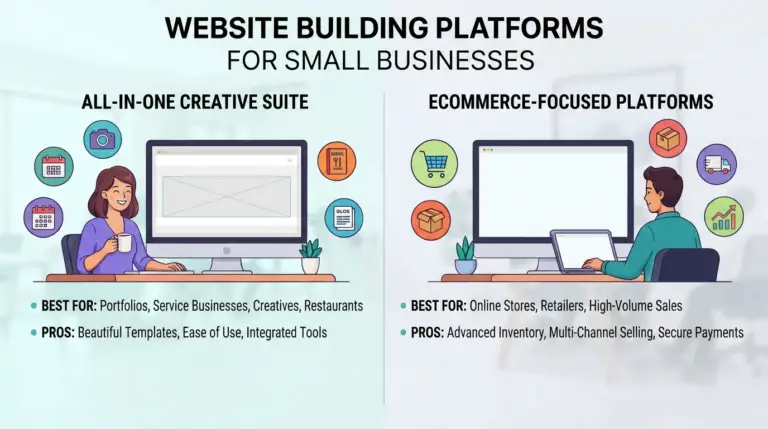
The next step is choosing a platform to create and manage your website. Your decision should depend on your technical skills, budget, website requirements, and future plans.
Source: Metaclosys, W3Techs data reported by Search Engine Journal
These figures describe reported website usage, not the percentage of businesses that achieve success with each option. Compare features and management requirements before choosing.
3. Plan the Essential Pages of Your Website
A professional business website should have a clear structure. You do not need dozens of pages when starting, but visitors should be able to find important information easily.
Consider creating these essential pages:
Homepage: Introduce your business, main services, and value proposition.About Us: Explain your experience, background, and what makes your business different.
Services or Products: Describe what you offer and who it helps.
Contact Us: Include your email, phone number, location, and enquiry form.
Blog: Publish useful articles that answer questions your potential customers search for.
For example, a plumbing company could create separate pages for emergency repairs, pipe installation, and maintenance services. This makes its offerings easier to understand and gives each service a dedicated page for relevant search queries.
4. Design a Mobile-Friendly Website
Your website should look and work properly on smartphones, tablets, and desktop computers. Use readable fonts, clear navigation, properly sized images, and buttons that are easy to tap.
Google uses the mobile version of website content for indexing and ranking through mobile-first indexing. This makes mobile usability an important part of website planning. Source: Google Search Central.
Avoid overcrowded layouts, unnecessary animations, and large images that slow down the page. Test important pages on different screen sizes before publishing.
5. Add SEO-Friendly Website Content
Search engine optimization helps search engines understand your website and helps potential customers discover your pages.
Start with keyword research. Identify the terms customers use when searching for your products or services, then include relevant phrases naturally in page titles, headings, URLs, and content.
Follow these basic SEO practices:
Write a unique SEO title and meta description for every important page.
Use one clear H1 heading and organize supporting topics with H2 and H3 headings.
Add descriptive alt text to meaningful images.
Create internal links between related pages.
Use descriptive URLs instead of random characters.
Publish original, helpful content that answers customer questions
Google recommends creating useful, well-organized content and using descriptive titles and links. However, following SEO practices does not guarantee that a page will be indexed or rank in search results. Source: Google's SEO Starter Guide.
6. Set Up Website Security and Analytics
Before launching, make sure your website has an SSL certificate and uses HTTPS. Set up regular backups, update your website software, and use secure passwords.
You should also connect Google Analytics 4 to understand visitor activity and Google Search Console to monitor search performance, indexing, and technical issues.
These tools help you understand which pages attract visitors and where improvements may be needed.
7. Test and Publish Your Website
Do not publish your website without checking how it works. Test every important feature, including contact forms, buttons, navigation menus, booking systems, and payment options.
Check for broken links, spelling mistakes, missing images, and slow-loading pages. Once everything is ready, connect your domain and publish the website.
After launch, continue updating content, monitoring performance, and improving pages based on customer feedback and website data.
How Metaclosys Helps You Make a Website for Your Business
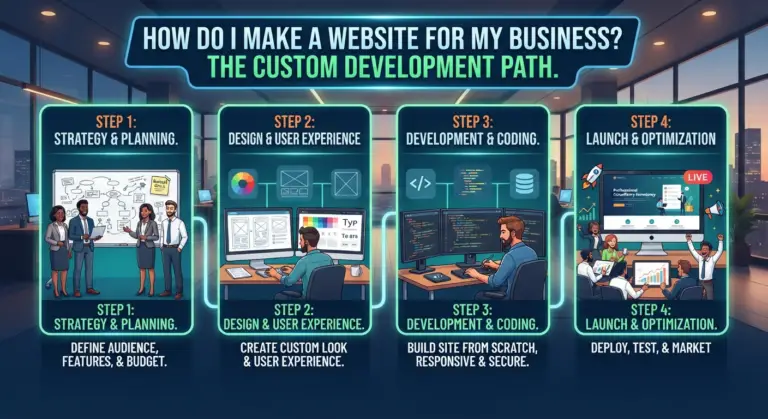
Building a website yourself can work well when your requirements are simple. However, businesses that need custom layouts, advanced functionality, or integrations may benefit from professional support.
Metaclosys helps businesses create websites designed around their brand, services, and customer needs. Its website development services include custom design, mobile-first layouts, SEO foundations, WordPress and custom CMS options, lead capture forms, booking features, and integrations.
For example, a law firm may need practice-area pages and consultation forms, while a salon may require online appointment booking. A growing service company might need CRM integration to organize customer enquiries.
If you want a website that supports your business operations as well as your online presence, explore Metaclosys website development services.
Frequently Asked Questions
1. Can I make a website for my business myself?
Yes. Platforms such as WordPress and Wix provide themes and website-building tools that allow you to create a business website without advanced coding knowledge.
2. How many pages should a business website have?
A basic business website can start with five essential pages: Home, About, Services, Contact, and Blog. You can add more pages as your services and content needs grow.
3. Do I need coding skills to create a business website?
No. Many website builders offer visual editors and ready-made templates. Coding may be necessary for advanced custom features or specialized integrations.
4. How do I make my business website appear on Google?
Create helpful, original content, optimize page titles and headings, make your website mobile-friendly, add internal links, and set up Google Search Console. You can also submit your sitemap to help Google discover your pages.
5. Should I hire a professional to build my business website?
Professional development may be useful if you need a custom design, advanced functionality, CRM integrations, e-commerce features, or technical SEO support. For a simple website, a DIY platform may be sufficient.